Event Tour
Forms
Forms capture information from registrants at the point of registration. Every event has at least one registration form. You can add custom questions — dietary preferences, T-shirt size, session pre-selection, emergency contact — and optionally map any of them directly to a Salesforce field on the Attendee or Contact record.
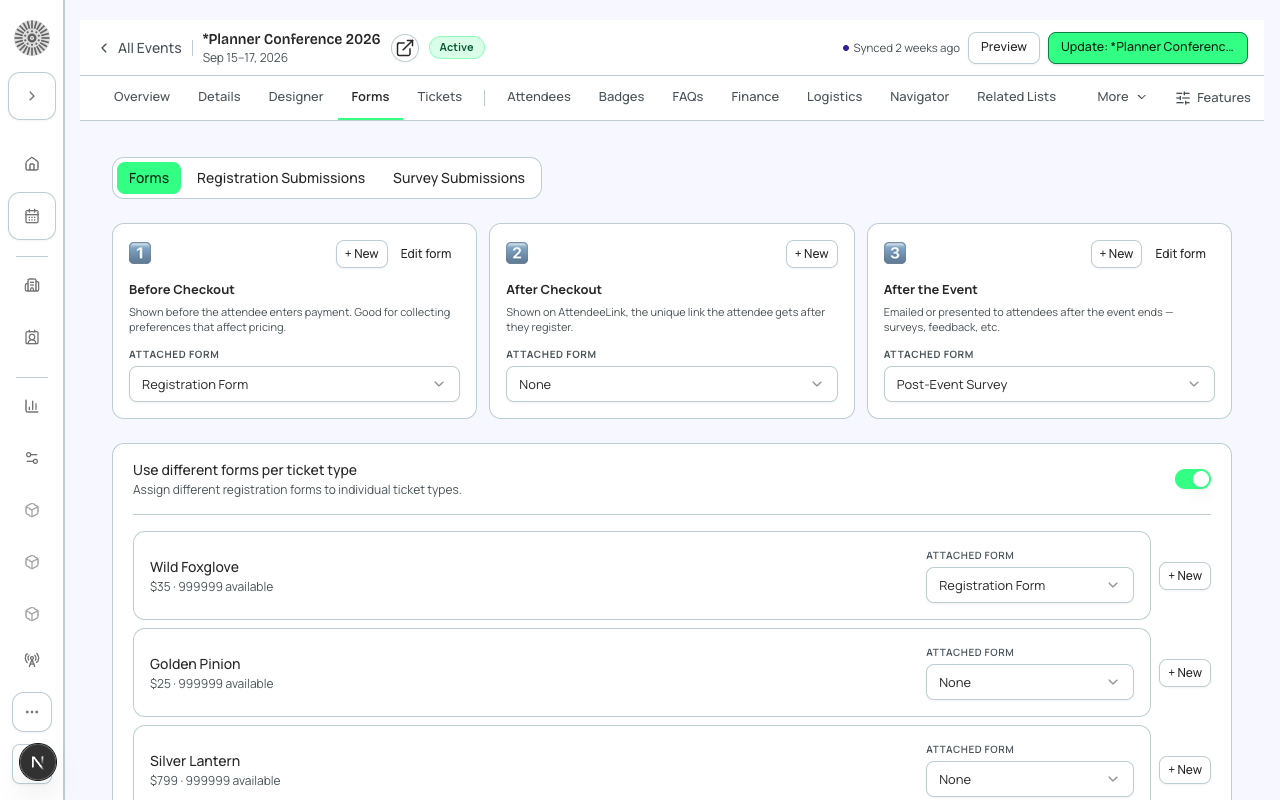
Form Types
| Form Type | When used |
|---|---|
| Registration Form | Shown during checkout. Captures attendee information at registration time. Every event requires one. |
| Session Sign-up Form | Shown when an attendee selects a session. Can capture session-specific preferences. |
| Survey Form | Post-event survey. Sent via email or displayed after check-in. |
| Waitlist Form | Shown when an attendee joins the waitlist. Can capture preferences for when they are promoted. |
Form Elements
A form is composed of form elements — individual questions or fields. Each element has a type, a label, and optionally maps to a Salesforce field.
| Element Type | Description |
|---|---|
| Text | Single-line free text (name, company, etc.) |
| Long Text | Multi-line text (e.g., dietary restrictions, bio) |
| Dropdown | Single selection from a list of options |
| Multi-select | Multiple selections from a list |
| Checkbox | Boolean yes/no |
| Date | Date picker |
| File Upload | Registrant uploads a file (e.g., headshot) |
| Section Header | Non-interactive label to visually organize the form |
| Waiver / Terms | Checkbox with linked terms text — must be accepted to continue |
Mapping to Salesforce Fields
By default, a submitted answer is stored on a Form Submission record linked to the registrant. You can additionally map an individual form element directly to a specific Salesforce field, so the answer is also written straight to that field on submission.
- Click a form element to open its settings.
- Under 'Salesforce Mapping', select the target object (Attendee, Contact, or Lead) and the target field to enable direct field mapping for that question.
- Only fields your SF admin has enabled in Admin > Field Mapping are available.
- Save. The mapping is live immediately for new submissions.
PII from form submissions stays in Salesforce
Forge never persists form answers in its own Postgres database. Answers are stored on Salesforce Form Submission records by default, and any question you've explicitly mapped is also written straight to the target field on Contact/Attendee. The conference360__Form__c record stores only the form definition.
Conditional Logic
Form elements can be shown or hidden based on previous answers. For example: 'If dietary preference = Vegan, show the Allergen Detail field'. Set conditions in the element's 'Show when' settings.
Reusing Forms Across Events
Forms can be cloned and reused. Go to the global Forms zone in the sidebar to see all forms and clone one for a new event. Cloning copies the form structure and field mappings but not the submitted responses.
| Forge | SF Object | SF Field |
|---|---|---|
| Form name | conference360__Form__c | Name |
| Form type | conference360__Form__c | conference360__Type__c |
| Form element label | conference360__Form_Element__c | Name |
| Maps to object | conference360__Form_Element__c | conference360__Maps_To_Object__c |
| Maps to field | conference360__Form_Element__c | conference360__Maps_To_Field__c |